

 QQ Avatar Fetcher
 Online Emoji Collection
 BMI Online Calculator
 Poison Mushroom Benchmark
 Fancy English Text Converter
 Online Special Symbols Collection
 Chinese ID Number Analysis
 Chinese Almanac Tool
 Keyboard Key Test Tool
 Chinese Relative Title Calculator
 Random Phone Number Generator
 Random Chinese Name Generator
 Simplified and Traditional Chinese Converter
 2027 Gaokao Countdown
 Chinese Character to Pinyin Converter
 Chinese Yuan Amount Converter
 Chinese Idioms
 Chemical Elements Periodic Table
 Satellite Coordinate Online Conversion
 Sensitive Word Detection Tool
 Schulte Grid Game
 Cat Circling Game
 Life Restart Simulator Online
 2048 Game
 Sheep Stack Game
 Chinese Idiom Chain Game
 Minesweeper Game
 Snake Game
 Number Guessing Game
 3D Crossy Road Game
 Online Video to Audio Extractor
 Online Video Compressor
 Online Video Converter
 Online Video Merger
 Online Video Muter
 Online Video Trimmer
 Online Audio Compressor
 Online Audio Converter
 Online Audio Trimmer
 Audio Volume Booster
 Online Audio Merger
 Online Audio Speed Changer
 Audio to Video Converter
 Audio Silence Remover
 Online Barcode Generator
 Online Image Stitching
 Image Resizer
 Online QR Code Scanner
 Image CAPTCHA Recognition
 Image to ASCII Art Converter
 Image Cropper
 Online QR Code Generator
 Image Base64 Encoding Converter
 Grid Image Cutter Tool
 Online Python Runner
 Markdown/HTML Converter
 Available Docker Image Mirrors in China
 HTML Formatter
 Online SSE Debug & Parser
 HTML Online Runner
 Unix Timestamp Converter
 Online Regular Expression Tester
 JSON Formatter
 XML Formatter
 IP Address Lookup
 Domain Whois Lookup
 Network Port Directory
 Auto Page View Refresher
 User-Agent Parser
 Website Status Code Checker
 Free SEO Backlink Generator
 Bulk Whois Lookup
 Screen Inspector
 Bulk Domain Availability Checker
 MD5 Online Decryption
 Image Steganography Tool
 Base64 Encoder & Decoder
 Online MD5 Encryption
 AES Encrypt & Decrypt
 Morse Code Encoder & Decoder
 JavaScript Obfuscator Tool
 Text Steganography Tool
 Unicode Encoder & Decoder
 URL Encoder & Decoder
 QQ Number Value Evaluator
 Age Calculator for Older Babies
 Coin Flip Simulator
 Truth or Dare Questions
 Book of Answers Online
 Real-time Income Calculator
 SBTI Personality Test
 Beast Language Translator
 Lucky Number Calculator
 Help You Search on Bing
 Message Board
 Toolshu Browser Extension
When monetizing with Google AdSense, accurate tax information configuration directly impacts withholding tax rates and payment efficiency. For AdSense users in the Asia-Pacific region—especially those with tax ties to China and Singapore—this guide details the application process for the Certificate of Chinese Fiscal Resident Status and how to update Singaporean tax details in the AdSense backend. Follow these steps to legally leverage tax treaty benefits and minimize tax liabilities.

I. Preparatory Step: Confirm Your AdSense Account’s Tax Jurisdiction
Before proceeding with tax configuration, it is essential to clarify your account’s tax jurisdiction first to avoid discrepancies in subsequent document preparation:
Log in to your Google AdSense backend and click Payment Information in the left-hand navigation menu.
Navigate to the Settings section and click Manage Settings.
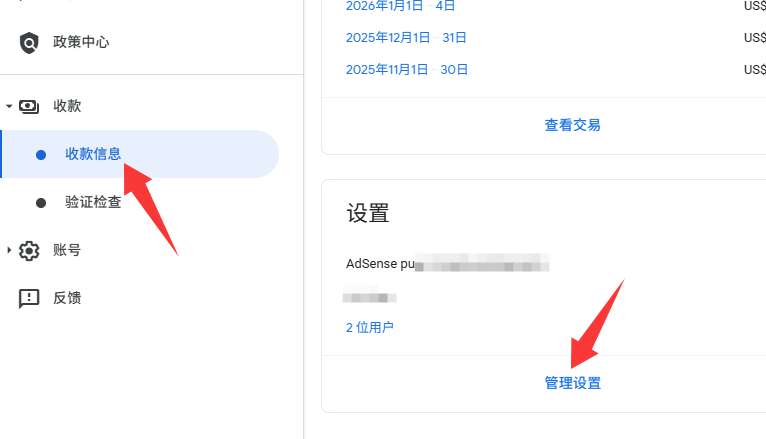
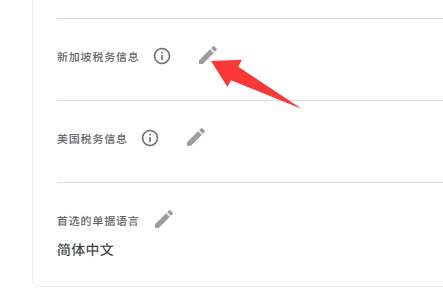
- Open the settings details page, scroll down to view the tax-related information, and confirm whether there is any Singapore Tax Information displayed. This guide applies specifically to Singapore tax scenarios; users in other regions may refer to local tax regulations for adjustments.
II. Applying for the Certificate of Chinese Fiscal Resident Status: Required Documents & Step-by-Step Process
The Certificate of Chinese Fiscal Resident Status is the core document for claiming preferential tax treatment under the China-Singapore Double Taxation Avoidance Agreement, which can significantly reduce withholding tax rates imposed by Singapore. Below is the complete application process:
(A) Mandatory Application Documents
Prepare the following documents in advance to ensure a smooth application:
- Identity Proof: Scanned copies of both sides of your valid Chinese ID card (merge into a single file using an online image stitching tool).
- Residency Proof: Submit one of the following: employment contract, business license (if applicable), property ownership certificate, or household registration booklet (hukou).
- Google AdSense Terms of Service: Download via the official link or access the Chinese version through cloud storage:
- Baidu Netdisk: https://pan.baidu.com/s/1LmrU_rxOkUqJ8ansRO7UgQ?pwd=dc8r
- Quark Cloud: https://pan.quark.cn/s/c93779725ba5
(B) Online Application Process via the Tax Bureau
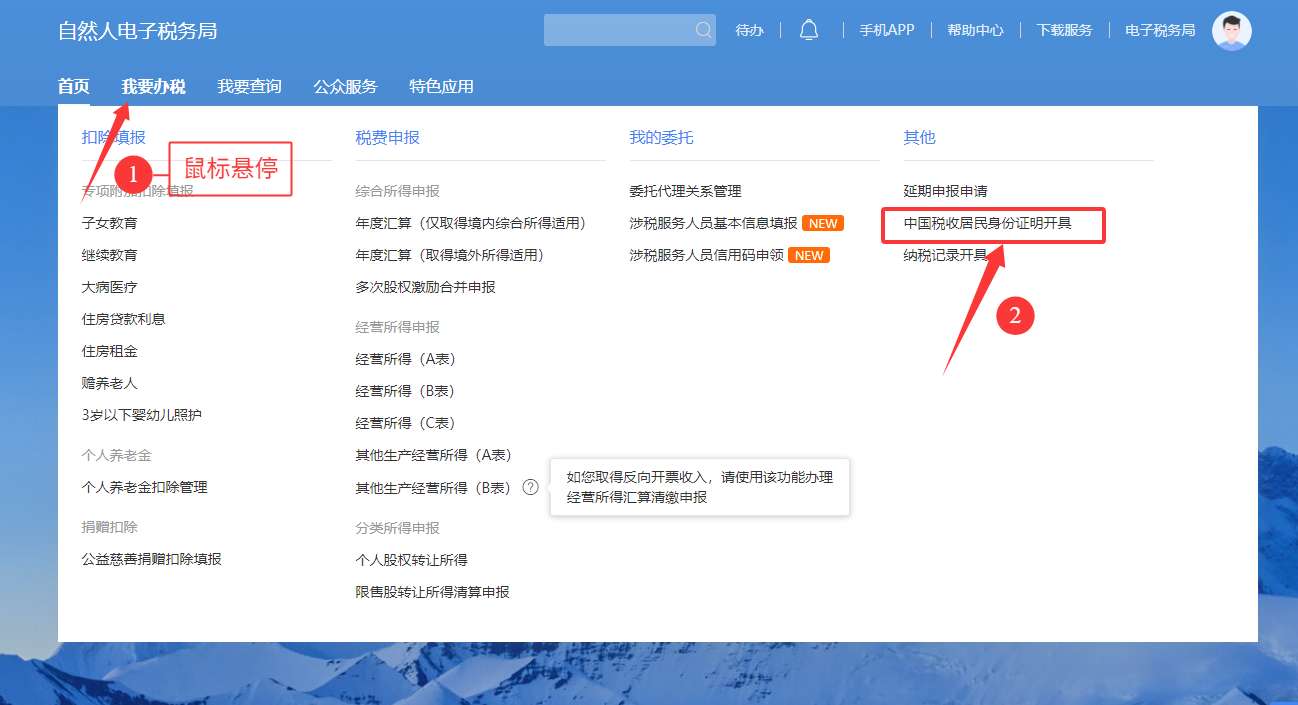
- Log in to the official website of your local tax authority (national unified portal: State Taxation Administration E-Tax Bureau).
- After logging in, go to the I Want to Handle Taxes section and select Issuance of Certificate of Chinese Fiscal Resident Status.
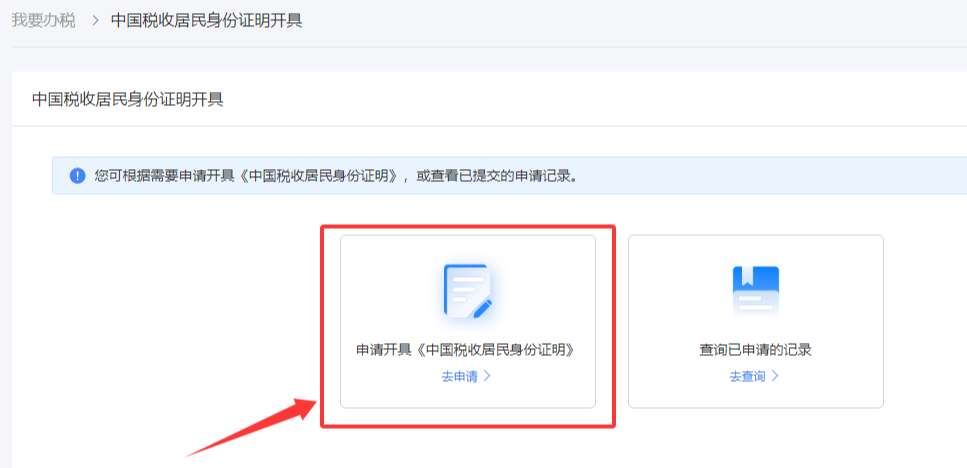
Click Apply Now and complete the form by following these steps:
- Step 1: Select the application year (e.g., 2026), choose Republic of Singapore as the counterparty country/region, and leave the remarks field blank.
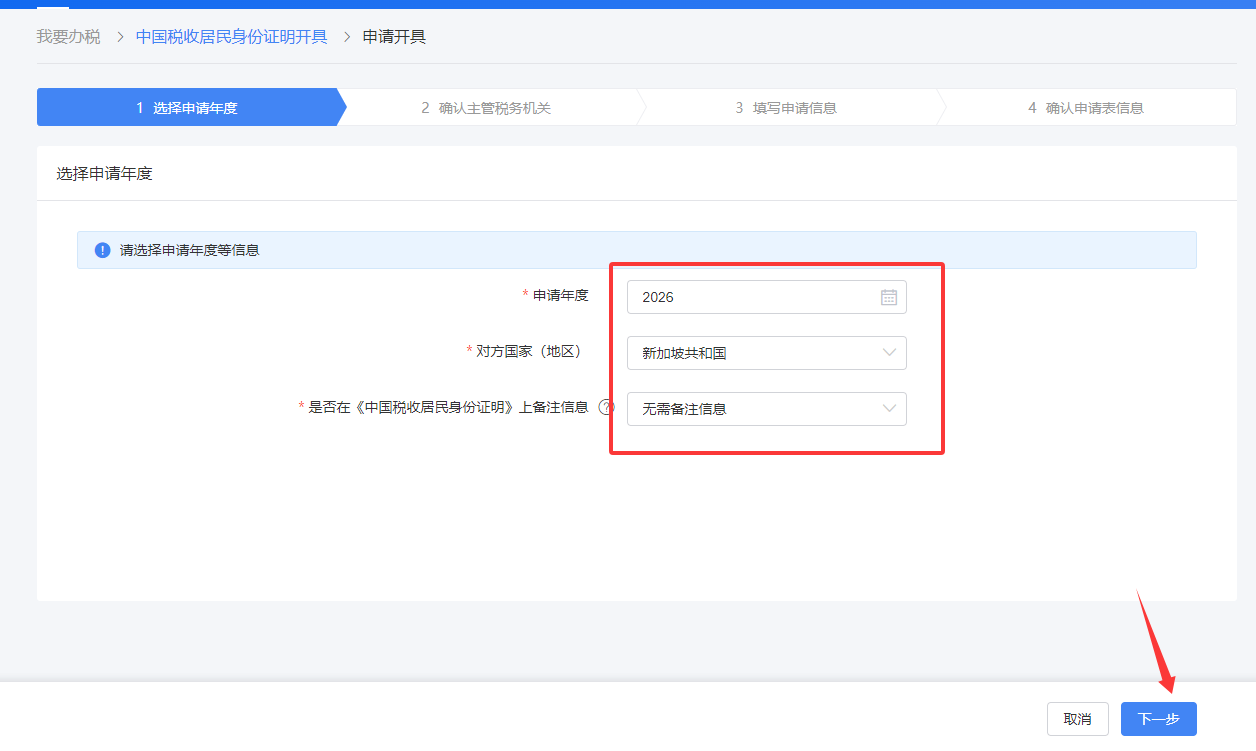
Step 2: Confirm the competent tax authority (usually auto-matched by the system, e.g., the tax authority affiliated with your employer).
Step 3: Fill in core application details:
- Purpose of Application: Select Claim Treaty Benefits.
- Counterparty Taxpayer Name: Enter the company name from your AdSense payment receipt: Google Asia Pacific Pte. Ltd.
- Proposed Applicable Tax Treaty: Select Agreement between the Government of the People's Republic of China and the Government of the Republic of Singapore for the Avoidance of Double Taxation and the Prevention of Fiscal Evasion with Respect to Taxes on Income.
- Proposed Applicable Treaty Article: Select Independent Personal Services.
- Income Amount for Treaty Benefit Claim: Convert your AdSense earnings from USD to CNY (e.g., enter "50000" for CNY 50,000).
- Estimated Tax Reduction Amount: Enter 25% of the above income amount (standard reduction rate under the China-Singapore Tax Treaty, e.g., "12500" for CNY 12,500).
- Supporting Documents: Upload the Google AdSense Terms of Service.
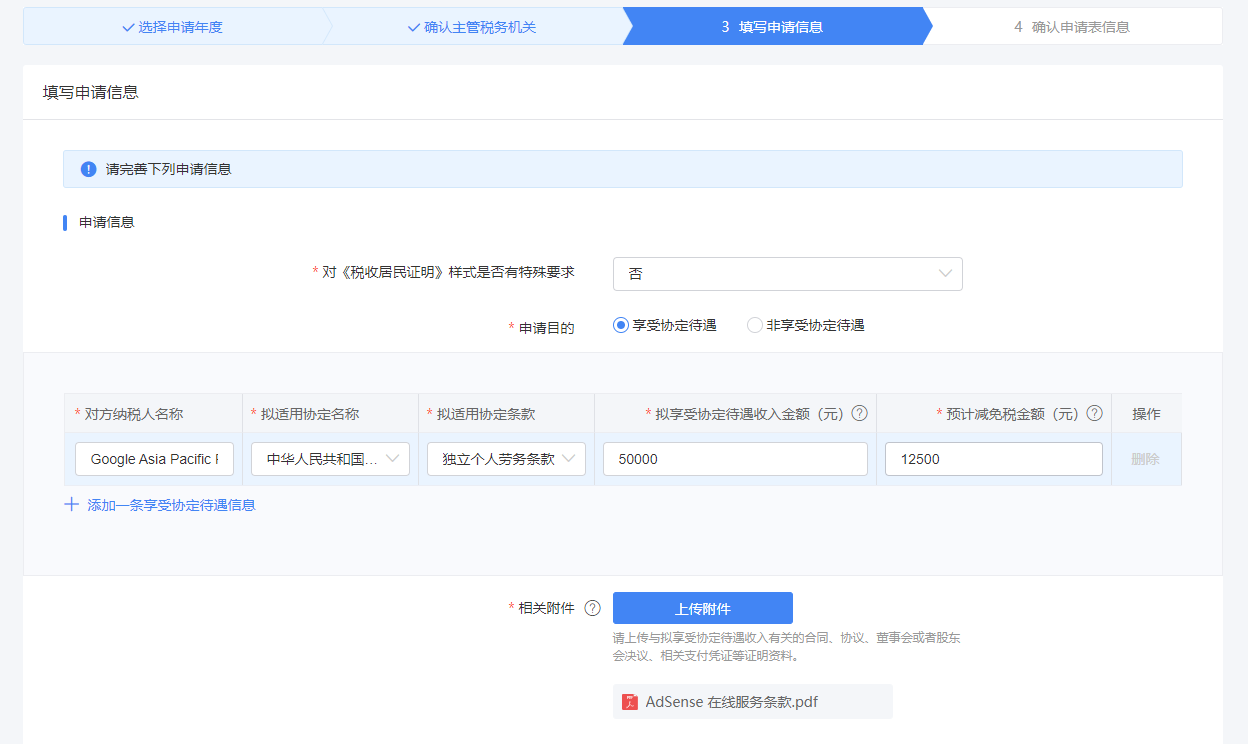
Step 4: Fill in applicant information:
- English Name: Optional.
- Do You Have a Domicile in China?: Select Yes.
- Residency Proof Basis: Choose according to your actual situation (e.g., Economic Interest Relationship if you are an employee).
- Applicant ID Documents: Upload the merged scan of your Chinese ID card.
- Additional Attachments: Upload one supporting document (e.g., your employer’s business license).
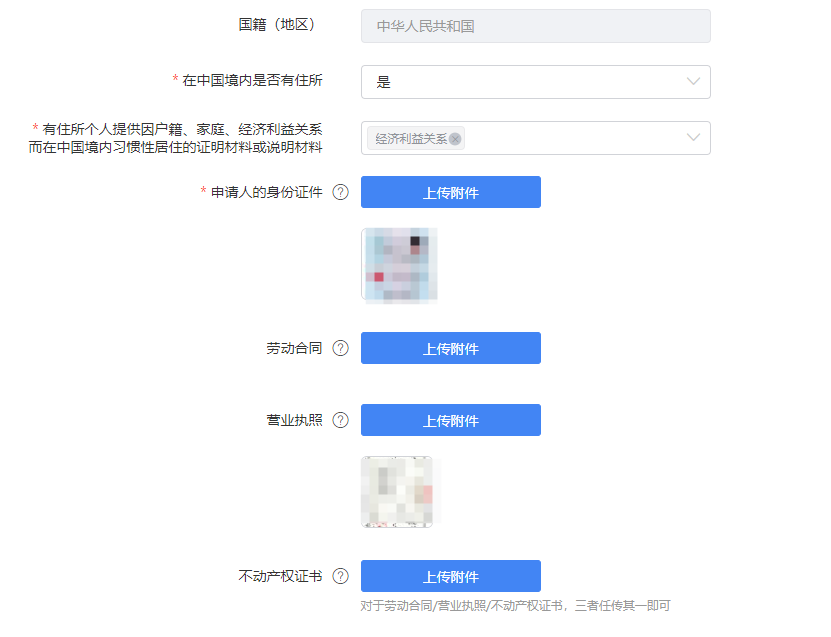
Important Note: If applying early in the year with no prior-year tax records, the system may fail to auto-recognize your employer in Step 2. In this case, manually select your residential address, and additionally upload your employment contract and personal tax records (available via the official China Personal Income Tax App) in the supplementary documents section.
Supplementary Information: Leave blank if not applicable.
Select Electronic Collection as the document delivery method, review all information for accuracy, and submit the application.
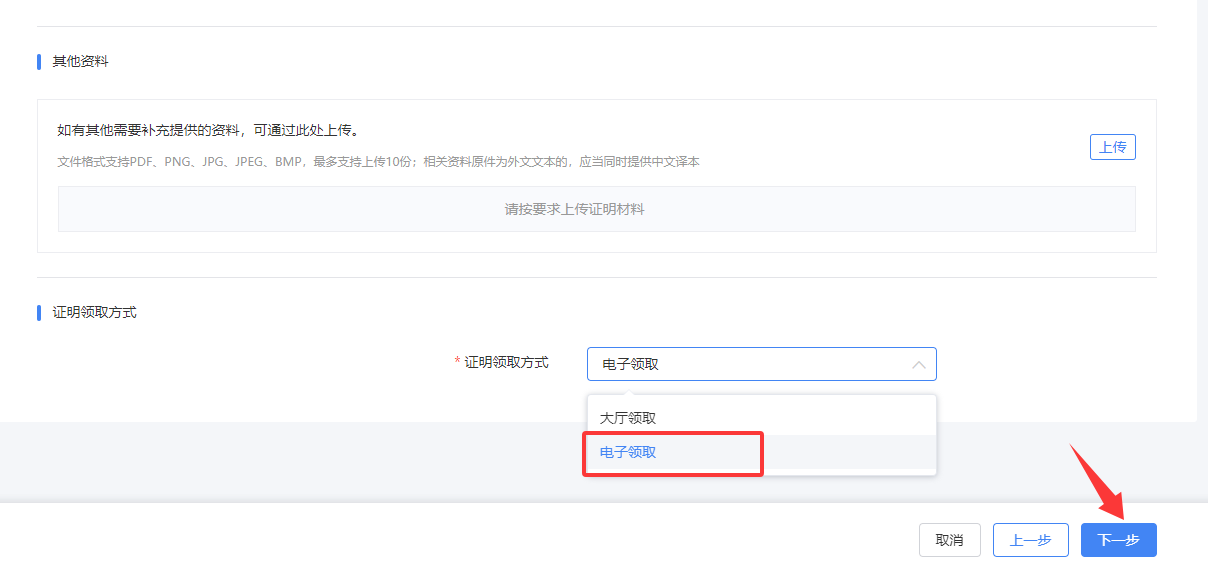
(C) Application Result Inquiry & Document Download
- After submission, the tax authority will review your application. Once approved, the status will update to Confirmed.
- Note: The certificate may not be available for immediate download after approval—allow 1–2 business days for processing. Log in again the next day to check, and download the Certificate of Chinese Fiscal Resident Status from the attachment section in the application record details.
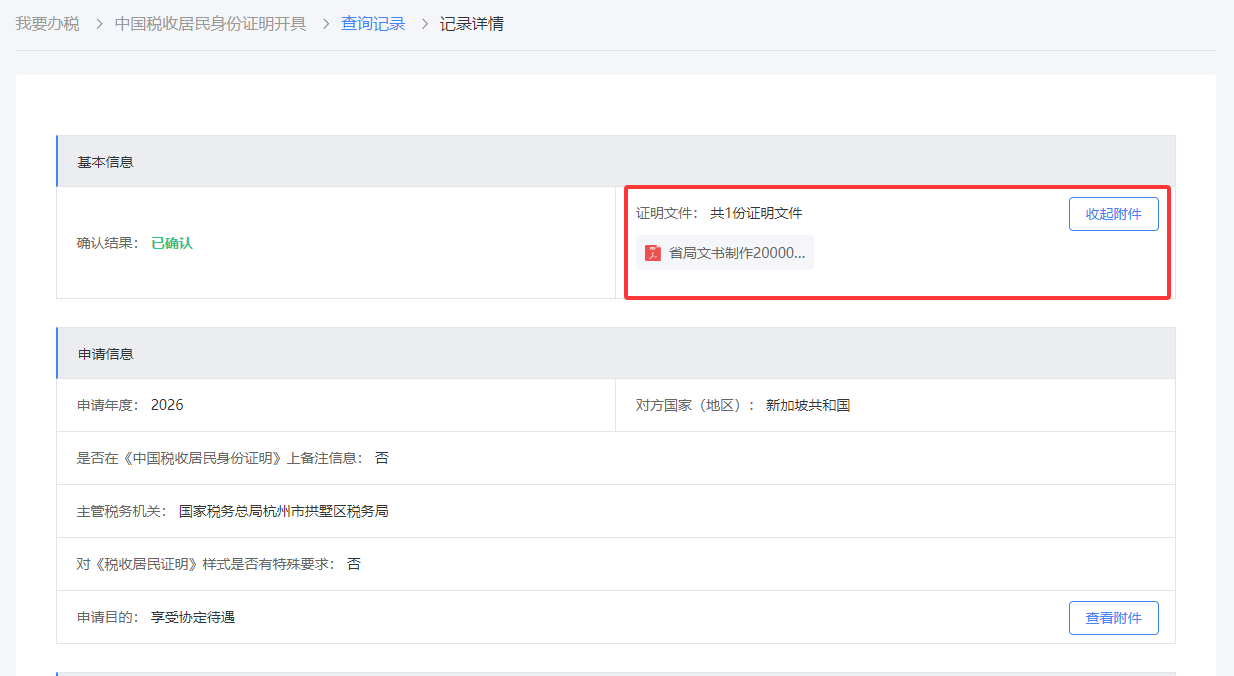
III. Updating Singaporean Tax Information in the AdSense Backend
Once you obtain the Certificate of Chinese Fiscal Resident Status, update your tax information in AdSense promptly to qualify for preferential tax rates:
- Log in to your AdSense backend and click Payments > Payment Information.
- Locate Manage Settings on the right-hand side, scroll down to the Singapore Tax Information section, and click Edit > Manage Tax Information.
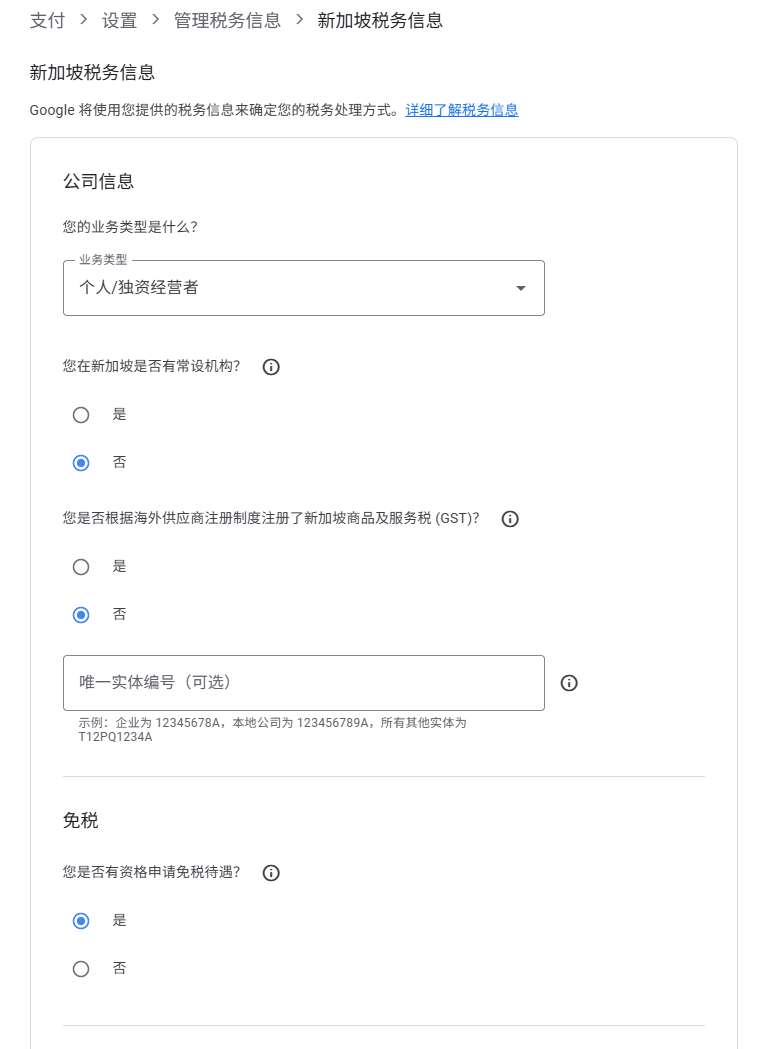
Click Start Form and fill in the information according to your personal circumstances:
- Business Type: Select Individual/Sole Proprietor.
- Permanent Establishment: Select No.
- Registered for Goods and Services Tax (GST): Select No.
- Tax Exemption Eligibility: Select Yes (critical step to claim tax treaty benefits).
Select China as your tax residency country/region. The system will prompt you to upload supporting documents—submit your Certificate of Chinese Fiscal Resident Status here.
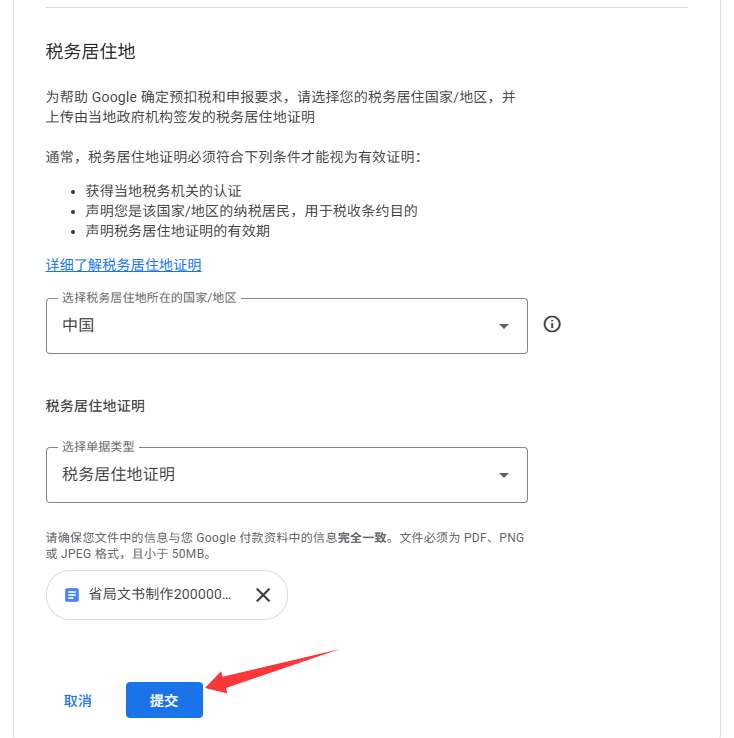
- Review all details for accuracy and click Submit.
Post-Submission Notes
- After submission, your tax information status will show Under Review. Google typically completes the review within 7 business days; once approved, the status will change to Accepted.
- You will receive an email notification of the review result. If additional documents are required, follow the instructions in the email to supplement your application.
- The Certificate of Chinese Fiscal Resident Status is valid for 1 year. Renew the certificate annually and update your AdSense tax information accordingly.
IV. Frequently Asked Questions (FAQs)
- Users in Other Regions: The application process is consistent—simply log in to the E-Tax Bureau and locate the Issuance of Certificate of Chinese Fiscal Resident Status function.
- No Prior Tax Records: Complete your personal income tax filing first to ensure you have valid tax records for the past year before applying.
- Delayed Review: If you do not receive a review result within 7 business days, contact Google AdSense support via the Help & Feedback section in the backend.
By following these steps, you can complete compliant tax configuration for AdSense and leverage the China-Singapore Tax Treaty to reduce withholding taxes. The key to success is ensuring complete documentation and accurate information entry. For further assistance, refer to the official Google AdSense Help Center or consult your local tax authority.
Article URL:https://toolshu.com/en/article/adsense-china-sg-tax
This work is licensed under a Creative Commons Attribution-NonCommercial-ShareAlike 4.0 International License 。




Loading...